All comma 3Xs come with a SIM card. The SIM slot is a push/pull mechanism: push on the card to release it, then guide it out.
Replace the SIM card
Make sure your SIM is inserted correctly by following the step-by-step guide below:
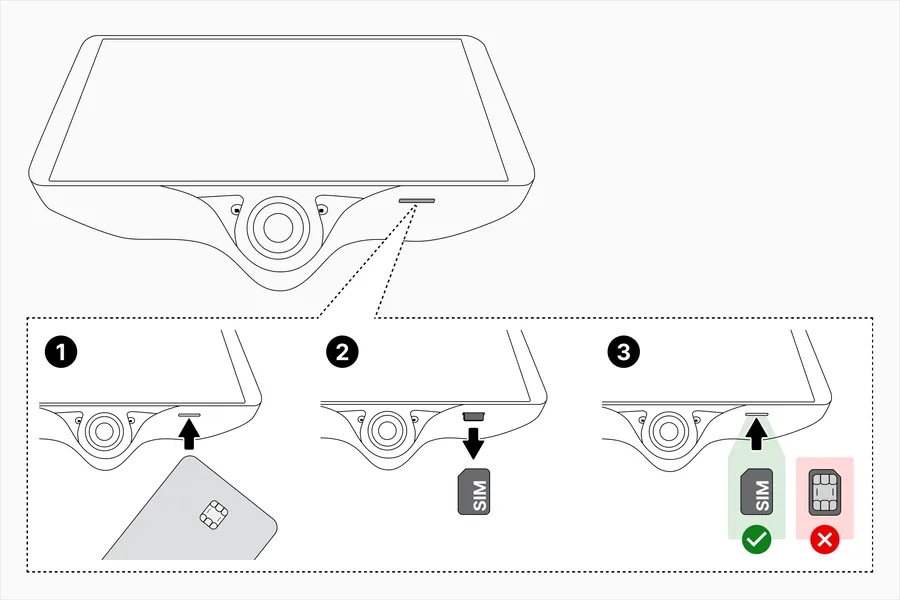
- With the comma 3X off and unplugged, tap/push the SIM card with the big SIM card, credit card, or other narrow hard object to release the SIM (you will hear a click).
- Gently pull the SIM card from the SIM slot (try tweezers).
- Push the SIM card into the SIM slot (with the metal contacts facing downwards) with your fingernail or plastic card until you hear a click or reach resistance. If you've done this step correctly, the SIM card should stay completely recessed inside the comma 3X.
We recommend you clean the camera lenses with a microfiber cloth before using the comma 3X again.
Activate the new SIM card
Once your new SIM card is installed, your comma 3X will need to connect to Wi-Fi to activate the SIM card. The best ways to get your comma 3X online are to use your phone's hotspot, bring your car somewhere with Wi-Fi, or connect your comma 3X to a USB charger in a place with Wi-Fi. Your comma 3X requires about 5 minutes of Wi-Fi connection and then can take up to 30 minutes to activate and might require a reboot. You will know the activation started when the device displays "CONNECT ONLINE".
After the next reboot, your SIM card should connect to the internet and you should have prime again!